








Soft Korner | Digital Transformation Partner
Many businesses have no shortage of data. In fact, they often have too much of it. The real challenge is getting the right information to the right people at the right time. When managers wait days for reports, executives struggle to access insights, and teams rely on outdated spreadsheets, a data bottleneck forms.
This bottleneck slows decision-making, reduces productivity, and limits growth opportunities.
The good news is that organizations across the USA and Canada are solving this challenge with Power BI Service. By providing secure, real-time access to business intelligence, it helps companies break down information barriers and make faster, smarter decisions.
What Is a Data Bottleneck?
A data bottleneck occurs when information is trapped within systems, departments, or reporting processes. Instead of flowing freely across the organization, valuable insights become delayed or inaccessible.
Common signs include:
- Employees waiting for reports from analysts
- Different departments using different versions of data
- Slow response times to market changes
- Manual reporting consuming hours every week
- Limited visibility into business performance
When data cannot move efficiently, decision-making suffers.
Why Data Bottlenecks Are Costing Businesses More Than Ever
Today’s business environment moves quickly. Customer expectations change rapidly, competitors launch new strategies, and market conditions shift constantly.
Without timely insights, businesses risk:
- Missing revenue opportunities
- Delayed operational improvements
- Poor customer experiences
- Inefficient resource allocation
- Increased reporting costs
A company may identify a declining sales trend weeks after it begins, losing valuable time that could have been used to correct the issue.
This is why modern organizations are investing in Power BI Service to eliminate reporting delays and improve information accessibility.
How Power BI Service Removes Information Barriers
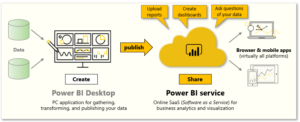
Power BI Service is a cloud-based analytics platform designed to make data accessible, actionable, and easy to understand.
Instead of relying on static reports, businesses can access live dashboards that update automatically as data changes.
This allows decision-makers to:
- Monitor performance in real time
- Share insights instantly
- Collaborate across departments
- Respond quickly to emerging trends
The result is a more agile and informed organization.
Step 1: Centralize Business Data
One of the biggest causes of data bottlenecks is fragmented information.
Sales data may exist in a CRM, financial data in accounting software, and operational metrics in separate systems.
Power BI Service connects these sources into a unified environment, creating a single source of truth.
Many organizations utilize power bi consulting services to streamline data integration and ensure consistent reporting across departments.
When everyone works from the same information, collaboration improves significantly.
Step 2: Make Data Accessible to Everyone
Traditionally, business intelligence was limited to analysts and technical teams.
Modern organizations need broader access.
With Power BI Service, dashboards can be shared securely across departments, giving managers and executives immediate visibility into performance metrics.
A power bi consultant can help businesses establish governance policies that balance accessibility with security.
This empowers teams to make decisions independently rather than waiting for custom reports.
Step 3: Create Dashboards That Drive Action
Data accessibility alone is not enough. Information must also be easy to understand.
When creating a dashboard in power bi, the focus should be on delivering actionable insights rather than overwhelming users with charts and numbers.
Following Best Power BI dashboard design practices can help organizations:
- Highlight critical KPIs
- Visualize trends clearly
- Reduce information overload
- Support faster decision-making
A well-designed dashboard transforms raw data into meaningful business intelligence.
Step 4: Enable Real-Time Monitoring
Static reports quickly become outdated.
One of the biggest advantages of Power BI Service is its ability to provide live insights.
For example, a manufacturing company can monitor production efficiency throughout the day rather than waiting for weekly summaries.
This allows teams to identify problems immediately and take corrective action before costs increase.
Real-time visibility creates a competitive advantage in fast-moving industries.
Step 5: Reduce Dependence on Manual Reporting
Many organizations spend countless hours preparing recurring reports.
Manual reporting often creates:
- Delays
- Human errors
- Inconsistent information
- Increased operational costs
By automating reporting processes through Power BI Service, businesses can redirect employee time toward strategic initiatives rather than repetitive administrative work.
The result is higher productivity and better resource utilization.
A Real-World Example of Eliminating Data Bottlenecks
A Canadian distribution company struggled with reporting delays across multiple branches. Regional managers relied on spreadsheets that were often several days old.
After implementing Power BI Service, the company:
- Connected inventory, sales, and logistics systems
- Created centralized dashboards
- Automated reporting processes
- Enabled real-time performance monitoring
Within months, managers gained immediate access to critical insights, improving inventory planning and reducing operational inefficiencies.
The biggest benefit wasn’t just faster reporting—it was faster decision-making.
Why Accessibility Is the Future of Business Intelligence
The future of analytics is not simply collecting more data. It is making data available when and where it is needed.
Organizations that remove data bottlenecks gain:
- Better organizational alignment
- Faster responses to market changes
- Improved operational efficiency
- Greater confidence in decision-making
- Enhanced business performance
As companies continue their digital transformation journeys, accessibility will become just as important as analytics itself.
Final Thoughts
Data should accelerate decisions—not slow them down. When information is trapped in systems, spreadsheets, and manual reporting processes, organizations lose valuable time and opportunities.
Power BI Service helps businesses eliminate data bottlenecks by centralizing information, improving accessibility, and delivering real-time insights that support smarter decisions.
Companies that make data available to the people who need it most are better positioned to adapt, compete, and grow in today’s rapidly changing business landscape.
Frequently Asked Questions
- What is the primary benefit of Power BI Service?
It provides real-time access to business insights through cloud-based dashboards and reporting. - Can Power BI Service help reduce reporting time?
Yes, automated reporting significantly reduces manual work and reporting delays. - Is Power BI Service suitable for growing businesses?
Absolutely. Flexible Power BI pricing for small business makes it scalable for organizations of all sizes. - How does Power BI Service improve collaboration?
It allows teams to access shared dashboards and work from the same real-time data source.
