







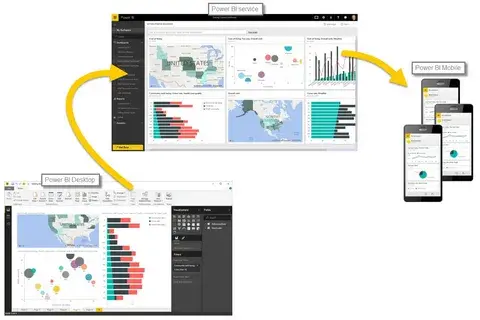
In the present data-driven era, companies in the USA and Canada create vast amounts of data every day from sales data to customer satisfaction, and from financial data to supply chain insights. Yet raw data holds no value unless it’s being converted into useful insights. That’s where Power BI services enter the scene.
Power BI is Microsoft’s robust business intelligence (BI) solution that turns dispersed data into interactive, visual, and dynamic dashboards. You can be either an enterprise-sized company or a small enterprise; Power BI enables you to make quick and smart, data-driven decisions.
This article shall cover all that you must know about Power BI services; what they are, why your company needs them, how to deploy them well, and the step-by-step guide to achieving the best outputs.
What Are Power BI Services?
Power BI is a service delivered over the internet and it is one of the solutions offered by Microsoft in the area of business data analytics. Its main features are the visualization of data, the sharing of insights, and the creation of interactive reports. The integration of the three fundamental aspects of data from modeling, visualization, to AI-driven analytics provides the users with a complete picture of the performance of their organization.
Power BI facilitates data extraction coming from different sources, such as databases, Excel sheets, and external apps, and it can turn the extracted data into live visual dashboards that are significant. Power BI not only enables but also empowers and encourages CEOs and other decision-makers in the organization to spot trends, predict outcomes, and make informed decisions instantaneously.
Why American and Canadian Businesses Are Opting for Power BI
The demand for USA and Canadian Power BI services has expanded very quickly over the last few years. Companies are starting to understand that the old ways of reporting aren’t able to keep up with how fast and sophisticated data is today. Power BI provides a number of benefits:
Ease of Integration: It integrates very well with software like Excel, SQL Server, and Microsoft Teams.
Cost Effectiveness: The Power BI pricing for small business is such that it is affordable even for startups with very limited financial resources.
Scalability: Power BI can smoothly transition from single department to entire enterprise data analytics without any trouble.
Cloud Accessibility: Data is always accessible and can be shared from any location, at any time.
No matter if you are looking for insights in marketing, accounting, or operations, Power BI will help your team to make quicker, wiser, and more informed decisions based on data.
Overwhelming Data, Insufficient Clarity
Almost every business faces this problem: huge amounts of data is collected but turned into no clear, actionable information. Departments don’t communicate with each other, it may take days to integrate reports, and decision-making has become based on guessing instead of strategy.
To illustrate, one of the accounting people may have to spend hours manual reconciling financial data between different systems. On the other hand, marketing management may not be able to access the real-time results of the running campaign. And, finally, top management might be left to decide the course of action based on outdated and misrepresentative reports.
That’s where Power BI services deliver the solution by bringing data sources together, streamlining reporting, and delivering visual insights in an easily understandable form.
How Power BI Services Cure Data Chaos
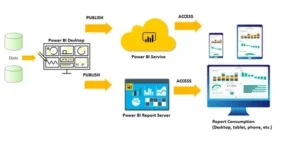
Let us take a step-by-step analysis of how Power BI services can introduce order, transparency, and productivity to your business intelligence process.
Centralize Your Data Sources
Power BI integrates with hundreds of data sources from cloud applications, CRMs, and databases. For example, connect Power BI to SQL Server to bring in real-time data from sales and other transactions. So, the data on the dashboards is always fresh and there is no need to do anything.
Create Personalized Dashboards
After the data connection, Power BI service allows you to generate a variety of dashboards with attractive looks. You can either choose from a range of pre-built visuals or visit the Power BI custom visuals marketplace to find specialty chart types and layouts.
A good dashboard presents a quick, user-friendly view of KPIs and company performance; thus, it is much easier to monitor the growth of the business with a mere glance.
Performance and File Management That Is Effective
When data sets grow larger, large files may cause the performance to drop considerably. The only option is to reduce Power BI file size to the smallest for faster loading times and more convenient sharing of reports. The tuning of data models, filtering off unneeded columns, and applying query folding are some of the techniques that help ensure productivity.
Optimize Collaboration and Sharing
Power BI makes sharing of data easier. Reports can be published, links can be shared, and one can even do Power BI export to Excel for more analysis. This is meant to give the end-users of different skill levels the opportunity to work easily with the data in their preferred format.
Improve Data-Driven Decision Making
Among the significant advantages of Power BI, its capability to do visual storytelling is the foremost one. The best Power BI dashboard design makes the insights instantly visible, thus, the users are directed towards making informed actions. Business managers get to easily compare previous trends, recognize patterns, and even foresee the upcoming results.
Embed Power BI for Real-Time Accessibility
For web-based platform providers, Power BI embedding in web applications is a major game-changer. It enables businesses to embed dashboards within internal portals or customer-facing apps providing users with real-time data insights without needing to change platforms.
Customize Power BI for Industry-Specific Needs
Power BI isn’t only for technology companies; it’s extremely useful for accountants, marketers, healthcare analysts, and manufacturers. For example, Power BI for accountants makes financial reporting, cash flow monitoring, and profitability analysis easier with automated, visual data.
Real-Life Example: Turning Data into Strategy
A Canadian mid-sized retail company was earlier facing the issue of isolated data in its inventory, sales, and customer management systems. Reports were taking so long to create that some of the important details were missed.
The organization, after the introduction of Power BI services, connected its databases onto a single platform. The managers were able to monitor stock levels, sales trends, and customer movements immediately. They reported a 25% increase in inventory accuracy and a 15% improvement in sales effectiveness after a few months.
This case proves that transforming data into actionable intelligence can change and enhance business performance drastically.
How to Choose the Right Power BI Partner

It is important to choose the correct Power BI service provider to ensure success. Choose a digital transformation partner that can provide:
Certified Power BI professionals
Full-cycle implementation and support
Best Power BI dashboard design and visualization solutions
Data integration plans that can scale
Industry-specific expertise
Soft Korner, being a reliable digital transformation partner, delivers customized Power BI implementation, integration, and analytics services that enable businesses to leverage their data.
Common Mistakes to Avoid with Power BI
Overloading Dashboards: Too many graphics confuse more than they clarify insights.
Disregarding Data Quality: Poor input data results in flawed output.
Omitting Optimization: Without file optimization, reports take a long time to load.
Forgetting User Training: Power BI implementation is most successful when your users know how to use it effectively.
Steering clear of these traps guarantees your Power BI investment generates measurable outcomes.
Future of Power BI in Business Analytics

The more sophisticated AI and machine learning integrations, the more luminous the future of Power BI services is. Predictive analytics, voice-driven insights, and real-time collaboration will further push the usage of data for the growth of businesses in the USA and Canada.
The Power BI product strategy is still aimed at making data analytics accessible to everybody from data scientists to everyday decision-makers closing the gap of complex data and business outcomes.
Empower Your Business with Power BI Services
In the digital world of today’s modern time, the businesses that manage data smartly get the maximum competition and great advantage. Power BI services can convert your unprocessed data into visual intelligence, thus enabling you to choose the right course of action that is quicker and more informed. No matter if you are a newborn start-up in Toronto or a business giant in New York, you are going to change your whole business performance measuring and viewing way by using Power BI.
Let your data transformation journey start today, and get to know the complete capability of your business insights through dependable Power BI implementation and support.
Frequently Asked Questions
1. How can Power BI help small businesses in the USA and Canada?
Power BI supports small businesses in the visualization of their performance data, discovering customer trends, and in the management of the allocation of resources all without the requirement of a dedicated team of data researchers.
2. Will Power BI be compatible with my current systems?
Definitely. Power BI is highly interoperable with existing software such as connect Power BI to SQL Server, Excel, Microsoft Dynamics, and many more to consolidate your data.
3. What areas does Power BI excel over Excel in terms of analytics?
Excel can manage data entry and do basic analysis; however, Power BI provides interactive and real-time dashboards along with enterprise-level business analytics that would be hard to ignore.
4. How often do Power BI dashboards refresh themselves?
This will be determined by your data source and how you set it up. However, Power BI dashboards can refresh automatically multiple times a day.
5. Is Power BI a secure place for storing financial data?
Power BI follows Microsoft’s enterprise-grade security policies, thereby ensuring that your data is protected and compliant from the start to the end.
6. Can Power BI reports be accessed via mobile devices?
Of course. Power BI offers apps for iOS and Android that allow users to view dashboards and reports in real-time from anywhere and at any time.
